Maybe I'll Never Track Expenses by Hand Again

Gavin,EssayTech
EN

Purchase cards from the phone sort themselves into a ledger while the avatar girl and cat watch

I had been annoyed by expense tracking for a long time. Every purchase means opening an app, picking a category, typing an amount, adding a note — and by the end of the month I cannot remember where the money went.

So in January I vibe-coded a mobile bookkeeping app called X, and chained together an iOS Shortcut named "Bookkeeping". A bookkeeping app is a good entry-level project for AI-assisted coding: the requirements are clear to you, the scope is small, and you can verify yourself whether it actually works. In plain words: I screenshot a payment order, it hands the image to a vision model, the model reads out the amount, merchant, date, and category, fills them into X, and I tap confirm. Back then I figured I would never have to track expenses by hand again.

Looking back, that was premature.

The ledger came first, then the design churn

X is a mobile ledger I built for myself. It opens straight to expense entry, with quick add, twelve categories, details grouped by date, and totals for today, this week, and this month. Search, grouping by note, and big-purchase markers arrived later, one detail at a time.

The interface went through several rewrites in the first week: glassmorphism, dark, neubrutalism — each one thrown out and redone. Later it gradually settled into an Animal Crossing style: three tabs for ledger, summary, and warehouse, cream paper backgrounds with brown text, a home screen that greets you with "Good afternoon, how is the wallet?", and an error screen that says "Oops, something went wrong."

Whether the ledger ever made sense is another question. I do like this interface.

My first real Shortcut

Tracking expenses was annoying enough that one day I wondered: could a screenshot just do it?

That was my first serious time with iOS Shortcuts. I chained together:

Take a screenshot → let the model read it → X shows a confirmation → submit.

The chain is assembled by tapping on a phone: no version control, no logs. When a step breaks, the only way to find it is to stare at the cards.

On the left is the chain I assembled; on the right is the screenshot it eats:

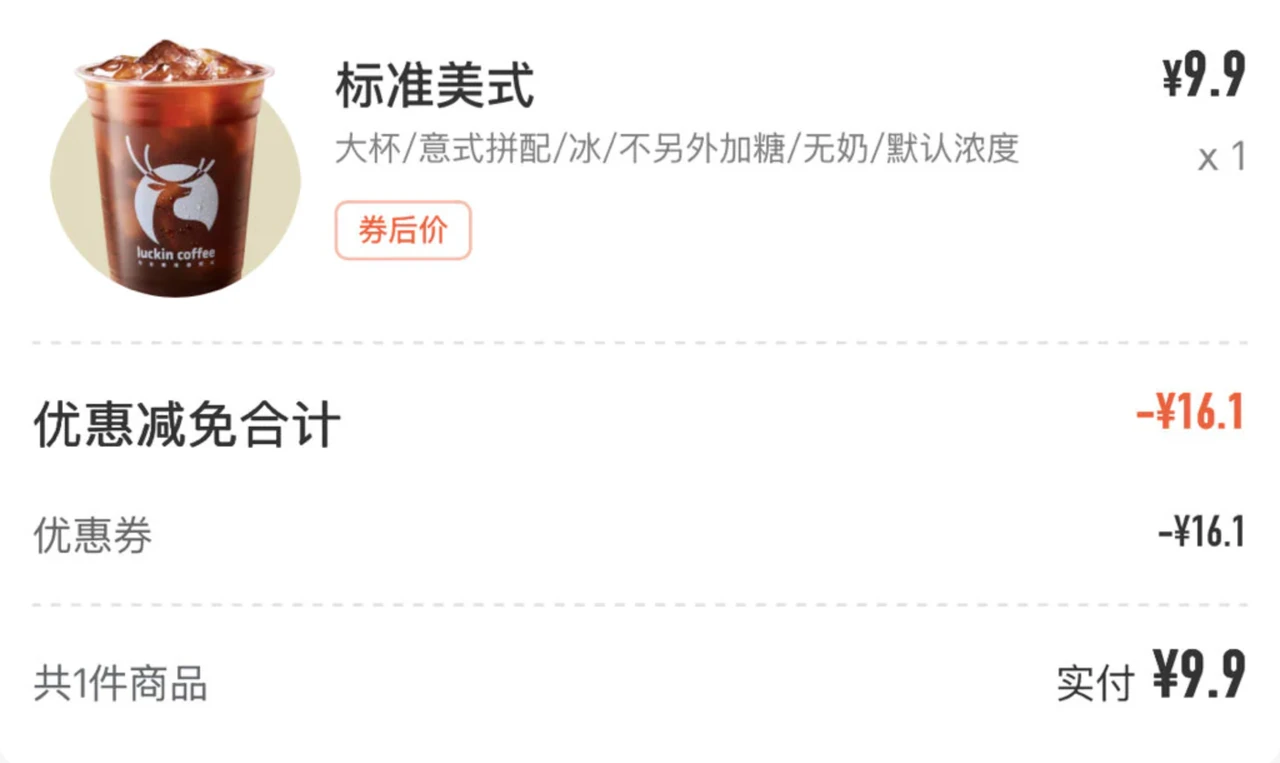
The Bookkeeping Shortcut editorInput: a Luckin coffee order screenshot

Why go through a vision model instead of traditional OCR? Because OCR only pulls the characters out and hands you an unstructured pile of text. On that Luckin receipt, OCR would spit out "standard Americano", "¥26", "¥9.9", "coupon −¥16.1", "Excellence City store"... Which number is the actual payment? Someone has to guess again. A vision model reads the whole image: it knows "actual payment" or "after coupon" is the right number, and fills in the merchant, time, and category in one pass. Receipts come in endless layouts; OCR needs a separate rule set for each, while the model does not — it just describes what it sees. The catch is that it confidently makes things up, which is why the confirmation step exists.

The first thing in the prompt is the amount priority. A screenshot contains more than one number: that Luckin order comes to 26 with discounts, but the actual payment after the coupon is 9.9, and picking the wrong one corrupts the ledger. So first look for labeled amounts like "actual payment" or "after coupon", then the total, then single-item prices. The category is a guess too: Luckin means drinks, an electricity bill means housing.

The recognized result never goes straight into the database. X shows a confirmation dialog first:

First confirm, then it is submitted:

The result comes back to X as a confirmation: amount, merchant, date, categoryAfter OK, the top banner says Expense submitted

"Amount 9.9 / Merchant: Luckin Coffee / Date: 2026-01-21 13:27:00 / Category: Drinks. Confirm?" Only after tapping OK does it hit the ledger. That step is for humans: the model gets it wrong often, and being able to edit at confirmation keeps bad entries out of the ledger.

For a while I genuinely believed bookkeeping was saved.

Another route: batch-import exported bills

Besides screenshots, there was another path: WeChat and Alipay both export bills. Batch-insert them into X.

I did not think about this route much. The two exports have different formats, and I did not write the parser myself — I just threw both files at Codex and let it sort them out: fields, categories, and the bulk insert, all handled by it.

And then... nothing

In the end I never actually analyzed my finances.

The Shortcut was also a hassle. It did save the amount typing, but every time: screenshot, run the Shortcut, wait for the recognition spinner, check the dialog, confirm. That is more steps than entering it by hand, and when the model was wrong you had to fix it. Once the novelty wore off, I did not want to run that whole flow for a 9.9 cup of Luckin. At that level of friction, it is no wonder it never caught on.

Then X grew other features. Things I bought could go into the "warehouse": active or scrapped, days since purchase, total spent. The bookkeeping app became a place for tracking stuff, and the Animal Crossing look kept getting cuter. The money still did not get analyzed.

X's source lives on GitHub: x (opens in a new tab) · x-server (opens in a new tab).

The opening line — "Maybe I'll never have to track expenses by hand again" — did come true in the end. I mostly stopped tracking expenses by hand.

The avatar girl closes the ledger, stretches, and naps with the cat