Logging Expenses from Payment Screenshots
X is an expense tracker I made. In January 2026, I connected it to a Shortcut on my iPhone: after paying, I could take a screenshot and run the Shortcut to have AI read the amount, merchant, and date and suggest a category. I could then confirm the entry and save it to X.
Which amount belongs in the ledger?
The test used a Luckin order: RMB 16.1 off and RMB 9.9 paid. Reading both numbers correctly wouldn’t be enough. Recording the discount as the expense would add RMB 6.2 to the cost of that coffee in the ledger.
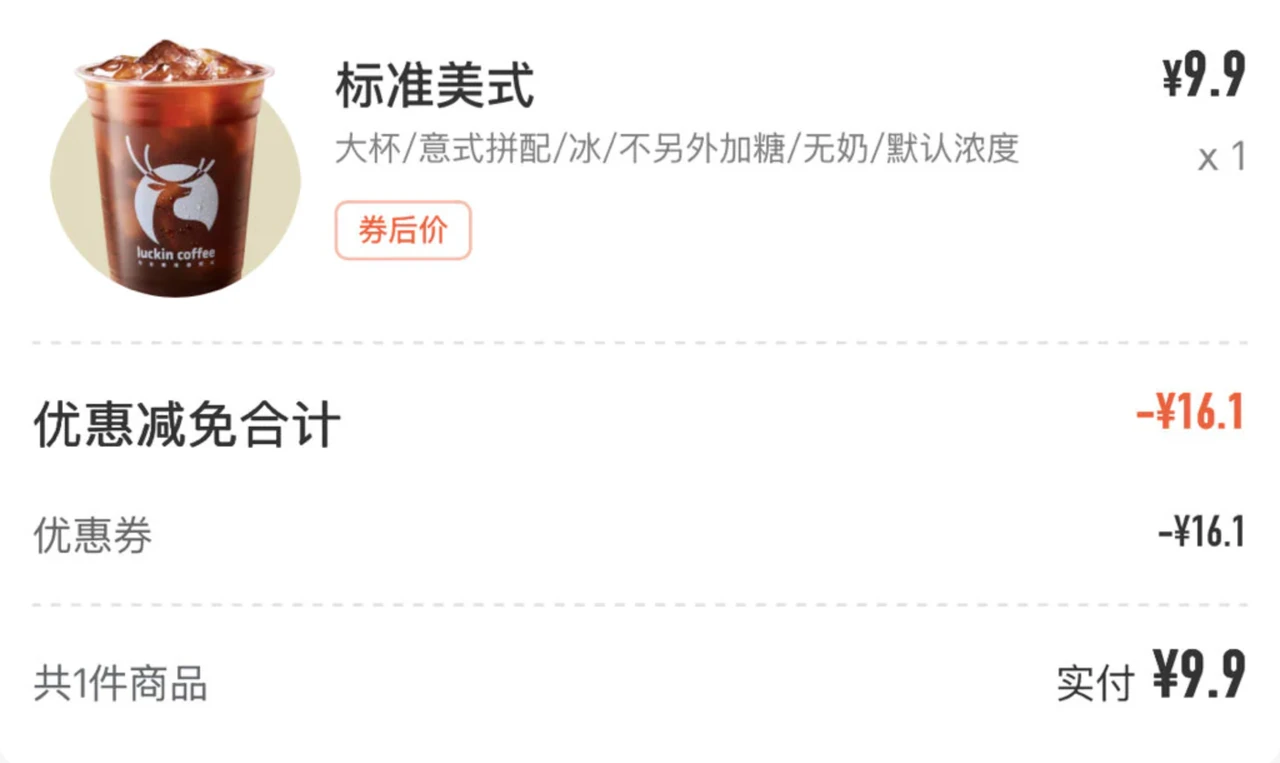
The January receipt: RMB 9.9 paid is the expense to record.
The prompt therefore asked for the paid or after-discount amount first. Another app might put its numbers in completely different positions. The labels beside them still matter. Reading the text and deciding which amount belongs in the ledger are separate tasks.
Reading it is only part of making an entry
The result can’t just be “Spent nine ninety at Luckin.” The ledger needs separate fields for amount, date, category, and note. The amount can be added up; the date determines which day it belongs to; the merchant or item name can go in the note. The entry also needs to say whether it is income or an expense.
That’s structured data: answers in named boxes. The program knows which box holds the amount, rather than having to find it in a sentence.
A field illustration based on this order, not an X screenshot. The drinks label follows the original confirmation dialog.
Categories need to use the ledger’s names too. If “coffee” and “milk tea” each become a separate category, finding total spending on drinks means combining them again. Putting them in the same category makes that total easier to calculate.
But both the discount and the paid amount fit in the amount field. Correct formatting means the value can be entered; it doesn’t tell me that it’s the right value.
The Shortcut showed a confirmation with the amount, merchant or item, date, and category. Tapping OK would submit it. For this order, it showed RMB 9.9, Luckin Coffee, January 21, and drinks. I still needed to check those details against the order before submitting.
Comments